





.png)










.jpg)
















.jpg)





%20(1).jpg)






.png)














Account mapping compares your account list to a partner's to find overlap you can act on. Here's how it works, where teams get it wrong, and how to build a process that survives more than one partner.

If you’re reading this article, it means you’re new to account mapping… welcome.
First of all, let me tell you something: account mapping is when you compare your account list to a partner's to find the overlap. That's it. That's the whole concept. Every vendor in this space will try to make it sound more complicated than that, usually right before they try to sell you something.
Here's the part that isn't simple: most teams still run this process with a shared spreadsheet, three email threads, and a rep manually eyeballing which rows match. It works, technically, the same way doing your taxes on paper works. It just doesn't scale past your second partner.
This guide covers what account mapping actually is, why it's become a core motion for partnership and sales teams instead of a partnerships-only nice-to-have, and how to build a process that survives contact with more than one partnership.
What is account mapping?
Account mapping is the process of comparing your company's customer and target account list against a partner's list to find shared or overlapping accounts. You're looking for companies where you and a partner already have a relationship, so you can use that shared context to close deals faster, get a warmer introduction, or spot an expansion opportunity neither side could see alone.
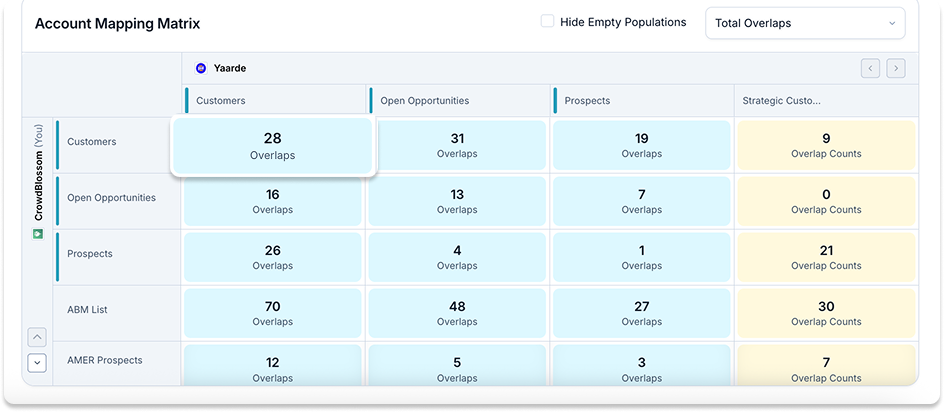
Account mapping helps you answer four main questions:
- Which of my target accounts are already my partner's customers?
- Which of my partner's target accounts are already mine?
- Where do we both have an open deal with the same company, and who should lead?
- Who do I need to contact at my target account's company?
The "close deals faster" part isn't just a talking point. Crossbeam, The Ecosystem Revenue Platform, customers consistently see overlap accounts perform better than the rest of the pipeline:
- Yotpo doubled their partner revenue using Crossbeam, Slack, and an Ecosystem-Led Growth (ELG) motion
- Zeta Global used ELG, Crossbeam, and LinkedIn Connections to drive a 30% Increase in enterprise leads
- JustCall dropped their average time to convert from 45–60 days to just 25–35 days on overlap-influenced deals
- Intellistack achieved over 110% of pipeline goals and 125% of revenue goals across Q4 2024 and Q1 2025
- Fundraise Up’s win rates climbed by double digits when partners are involved (and it’s even higher when two partners collaborate)
Deals sourced through overlap accounts also tend to run bigger: across Crossbeam's network, average opportunity size on shared accounts runs about 23% larger than deals with no partner overlap at all. None of that is because the accounts are inherently better; it's because a warm relationship removes friction a cold one has to fight through.
Why account mapping works
Cold outbound is getting more expensive to run and less likely to land. Buyers have gotten good at ignoring it. Account mapping sidesteps the whole problem: instead of guessing who might be a fit, you start from accounts where a trusted partner already has a relationship.
A rep who knows "this prospect already runs our partner's product" walks into that call with a level of credibility no personalization template can fake. For partnership teams, account mapping is also the entry point to co-selling; you can't run a real co-sell motion without first knowing where your customer bases intersect. For sales teams, it's a prioritization filter: overlap accounts close faster because a layer of trust already exists before the first call happens.
How account mapping actually works, step by step
- Pick a partner who shares your buyer, not just your product. A CRM partner and a marketing automation partner often sell to the same ideal customer without competing for the same line item. That's the fit you want.
- Share account lists securely. Both sides sync customer lists, target accounts, or open opportunities, ideally without either party seeing the partner's full list, just the matches.
- Surface the overlaps. Good tooling does this in minutes. A spreadsheet reconciliation does it in days, and only for the partners you remembered to update.
- Add context to each match. A list of matching company names tells you nothing on its own. Deal stage, contract value, renewal date, who owns the account on both sides; that's what makes an overlap actionable.
- Route it to a human who can act. An overlap sitting in a dashboard nobody opens doesn't close anything. Push it into the CRM or Slack, wherever your rep is already working.
- Act on it. A warm intro, a joint call, a note in the CRM so the next person who touches the account knows the partner relationship exists.
Where account mapping programs go wrong
Most account mapping programs don't fail because the concept is wrong. They fail in a handful of predictable, avoidable ways, usually because the "process" was never actually a process, just a good intention from a kickoff call six months ago.
- Treating it as a one-time project. Account lists change weekly. A mapping exercise from last quarter is already out of date.
- Mapping ten partners on day one. Start with two or three high-fit partners and prove the motion works before you scale it.
- Stopping at the spreadsheet. The overlap list is where the work starts, not where it ends.
- Skipping security. Emailing a full customer list to a partner is a real risk, not a hypothetical one. Each side should only see what the other explicitly agreed to share.
- Ignoring CRM hygiene. Duplicate records, mismatched domains, dead opportunities still marked "open," and inconsistent naming between your CRM and your partner's CRM all produce false matches or hide real ones. If your own account data is messy, the overlap report inherits that mess.
Account mapping vs. the spreadsheet
Plenty of teams still do this manually: export both lists, match rows by hand, repeat next quarter. It holds up for two partners with small lists. It falls apart the moment a third partner joins, because now three spreadsheets are going stale at three different rates, and nobody's job is to notice.
Purpose-built account mapping tools keep the data live instead of frozen at last quarter's export. Overlaps recalculate as records change on either side, which sounds minor until you realize how much of a partnership program's value depends on catching a match the week it happens instead of the quarter after.
How Crossbeam approaches account mapping
Crossbeam's Account Mapping engine solves the mechanical problem: comparing account lists securely and fast, no exports, no stale spreadsheets. But the overlap data is only half of it.
Every account mapping relationship also feeds the Crossbeam Network, a second-party data layer built from more than 30,000 companies. That's the kind of asset AI search actually rewards, because it's proprietary and can't be reconstructed by scraping the open web. Nobody else has your specific overlap data, which is precisely why it's worth building a real process around it instead of a quarterly spreadsheet habit.
What this looks like inside Crossbeam
Crossbeam turns your partner ecosystem into the proprietary intelligence layer your competitors can't buy. If you're setting this up in Crossbeam specifically, the six steps above compress into something closer to fifteen minutes of setup, then it runs on its own:
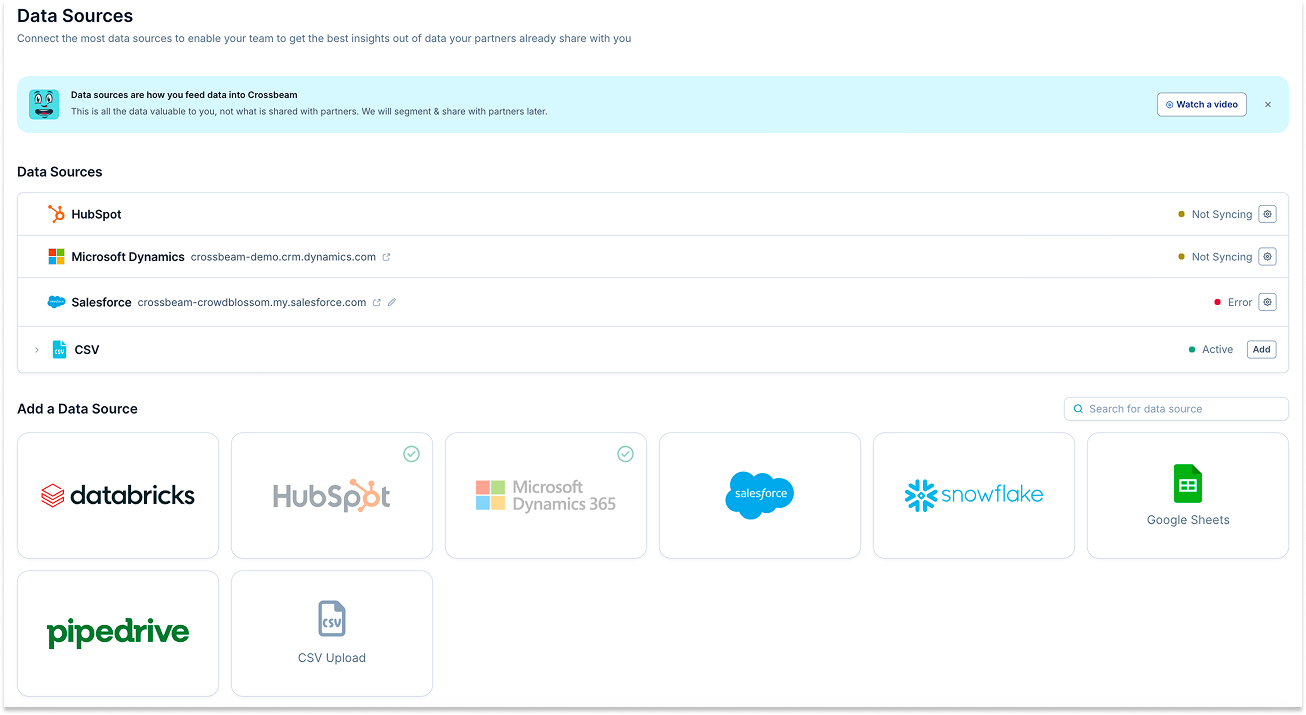
- Connect your CRM. Crossbeam syncs directly with Salesforce, HubSpot, or your data warehouse; you can also upload a Google Sheet or a CSV.
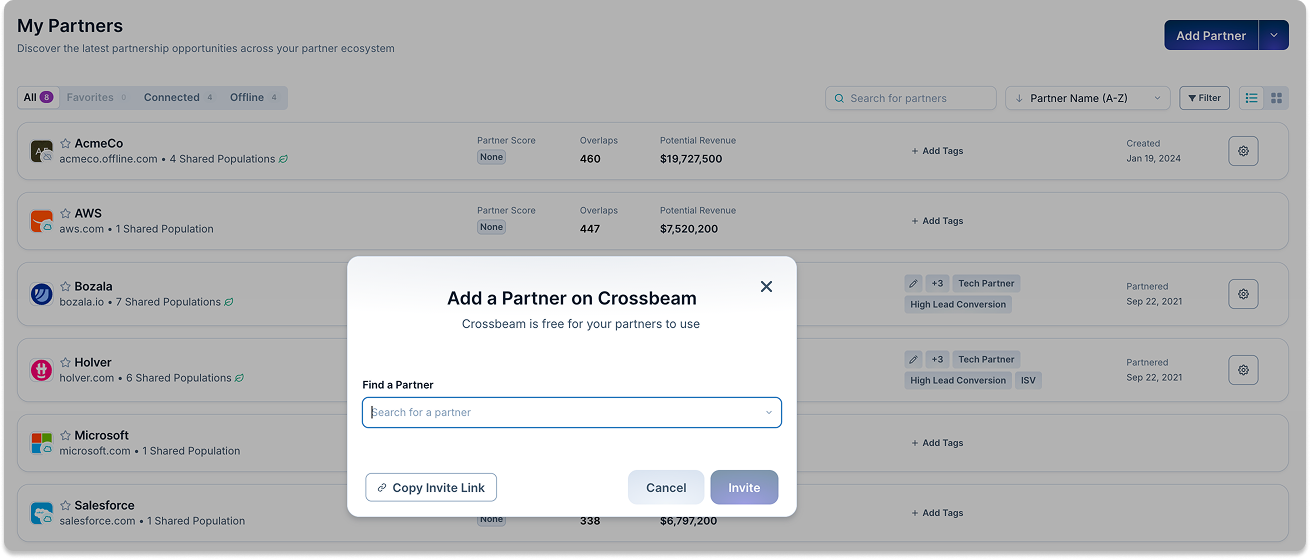
- Send a partner invite. Search for the partner in Crossbeam's network (most B2B software companies are already on it) and send a connection request. If they're not yet on Crossbeam, they can join for free to accept it.
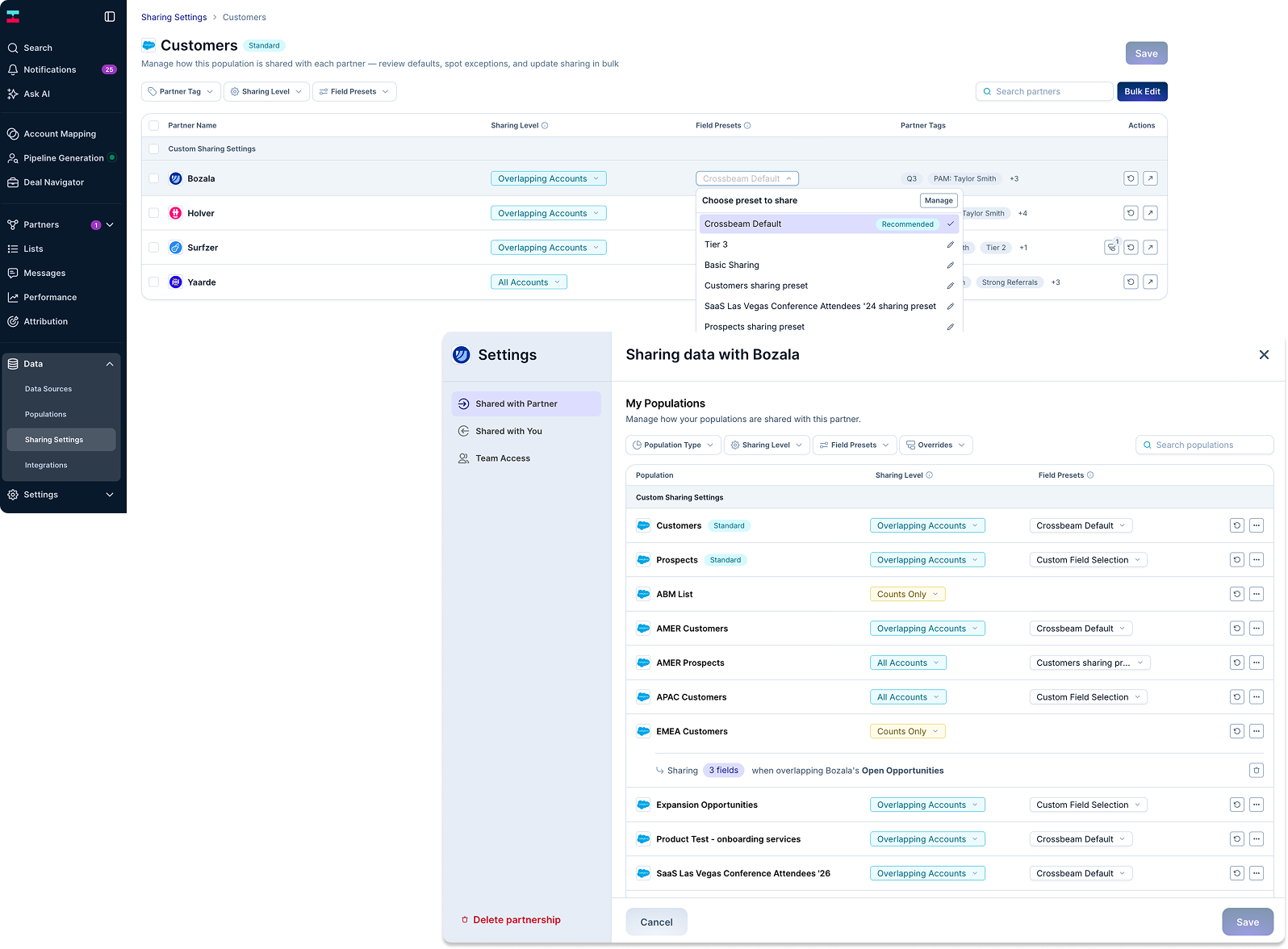
- Set your data-sharing rules. Choose what you're comfortable sharing: just the overlap count, specific fields like account owner and deal stage, or full account-level detail. Your partner sets their own rules independently. Neither side sees more than what the other agreed to.
- Pull the Account Mapping Matrix. This is the report both sides review together, usually in a recurring partner check-in. Filter by ICP fit, deal stage, or account owner to get from "here's everyone we share" to "here are the five worth acting on this week."
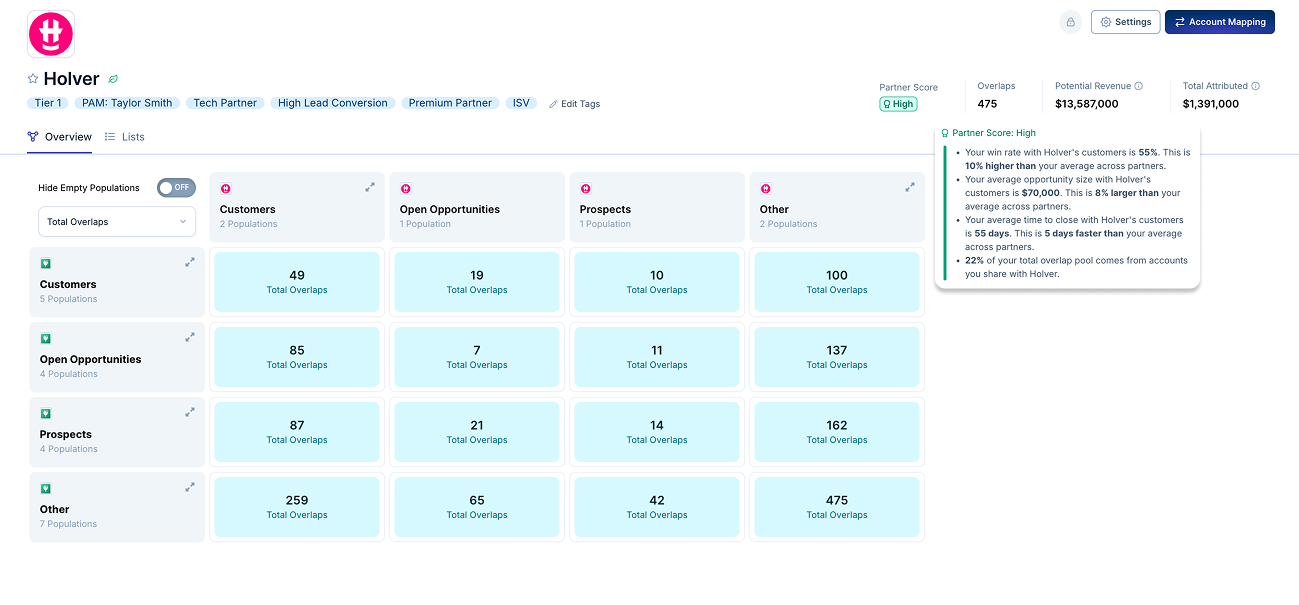
- Push overlaps to where reps already work. Crossbeam can route matches into Salesforce fields, Slack alerts, or HubSpot properties, so a rep sees the partner context sitting right on the account record instead of needing to check a separate tool.
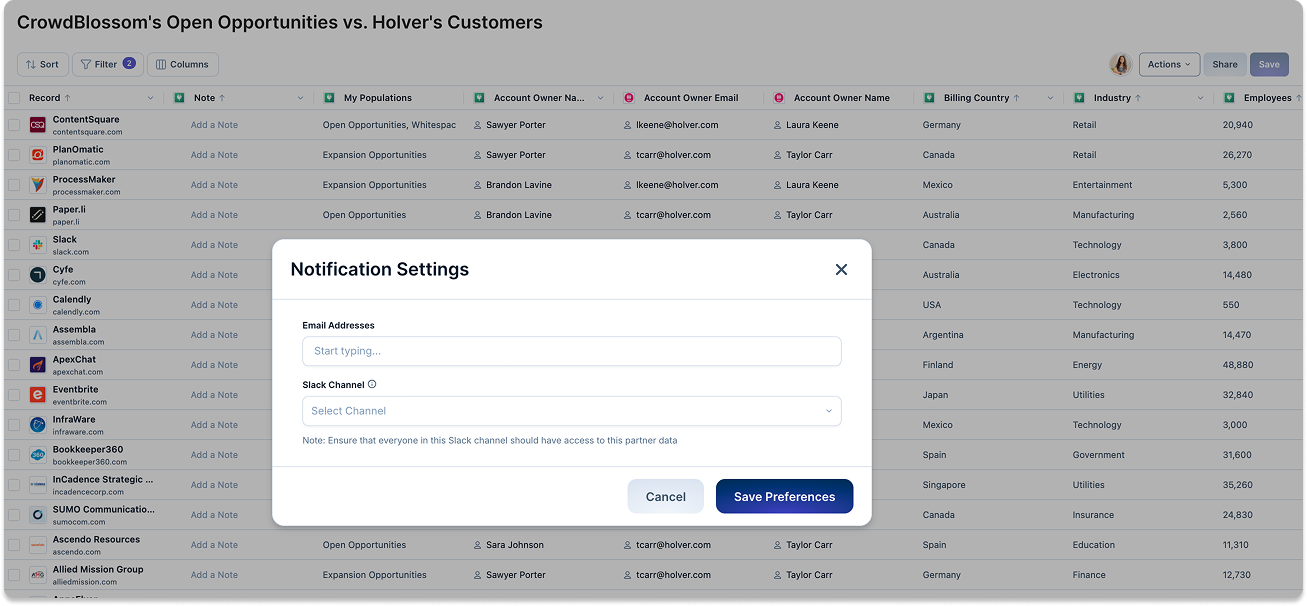
- Let it run continuously. Once connected, the matrix updates automatically as either CRM changes. No one has to remember to re-run it next quarter.
Account mapping use cases: what this looks like in practice
Account mapping shows up differently depending on what a team is trying to solve. A few real examples:
Prioritizing sales outreach instead of cold-calling a full list. Bombora's partnerships team used account mapping to see exactly which of their prospects already overlapped with a partner's customers, then handed reps a short, named list instead of a generic target account list. The result: $100,000 in new revenue in two months, sourced from accounts the sales team would otherwise have approached cold.
Building a partner-led culture from a team of one. Friendbuy's partnerships lead started out running overlap checks manually in a spreadsheet, VLOOKUPs and all. After moving to Crossbeam, 35% of Friendbuy's opportunities became partner-influenced or sourced within 18 months, and outbound opportunities sourced through partners increased 45%.
Tiering partners so account-level data sharing scales. Intercom uses account mapping as the input to a "Partner Prioritization Framework," sharing only overlap counts with lower-tier partners and full account-level detail with the partners they co-sell with most closely. That structure is what let them drive 30% more sourced revenue without opening up sensitive data to every partner equally.
Turning overlap into retention, not just new pipeline. FullStory uses account mapping to see which customers have a live integration with a partner, then targets those accounts with adoption campaigns. Customers with a live partner integration showed a 4-point increase in gross dollar retention and a 6-point increase in net dollar retention compared to customers without one.
Triggering product adoption the same day a feature ships. JustCall's product and customer success teams use the same overlap data that partnerships uses for co-selling, flagging customers who already use a newly integrated partner tool so CS can reach out the day a new integration goes live. Integration adoption climbed from roughly 50% to nearly 60% of JustCall's customer base as a result.
What happens once there's a match?
Finding the overlap is the easy part. What you do next is where most of the actual revenue gets made, or left on the table. Here's the sequence for turning a match into a co-sell or co-marketing motion instead of a name sitting in a spreadsheet:
- Qualify the match first. Not every overlap deserves action. Check deal stage, account owner, and whether the partner relationship is even active on both sides before you reach out to anyone.
- Loop in the account owner on both sides. A match only becomes useful once the two humans who actually own the relationship know it exists. A quick message, in Slack or in the CRM, beats waiting for the next scheduled partner sync.
- Decide who leads. If it's a live deal on both sides, agree on who's driving and who's supporting before either rep talks to the customer. Nothing kills partner trust faster than two reps showing up to the same account with conflicting stories.
- Ask for or make the warm introduction. If the account is a customer of your partner but not yet yours, this is the moment to ask for an intro instead of cold-calling in. If it's the reverse, offer one.
- Pick the play: co-sell or co-market. For an active deal, that usually means a joint call or a reference conversation. For a broader overlap segment (say, fifty shared accounts with no open deal), that's a co-marketing play instead: a joint webinar, a co-branded case study, or a targeted campaign to the accounts you both already touch.
- Document the outcome. Log what happened, win, loss, or still in motion, back in the CRM or the account mapping tool. This is what makes the next quarter's matches better instead of starting from zero again.
- Review the pattern, not just the deal. Once you've run this a few times with a partner, look at which types of matches actually convert. That's what turns account mapping from a one-off tactic into a repeatable motion.
Built for AI: accessing Ecosystem Intelligence through Claude, ChatGPT, Glean, or your own agents
All of the above assumes a human is opening a dashboard to look at the overlap. Increasingly, that's not how this data gets used.
Crossbeam MCP is a remote server built on the Model Context Protocol, the open standard that lets an AI assistant talk to a piece of software directly instead of a person copying and pasting between two tabs. It gives tools like Claude, ChatGPT, Glean, or a custom-built internal agent secure, structured access to your Crossbeam data, so an AI can pull real ecosystem context into a workflow instead of a rep manually checking the Account Mapping Matrix before every call.
In practice, that means asking Claude or ChatGPT something like "which of my open opportunities have an active partner working the same account?" or "who at [Partner] can help me get a warm intro to [Account]?" and getting an answer pulled straight from your live Crossbeam data. The same connection lets an agent surface ranked partner recommendations for an open deal, using the same recommendation engine behind Deal Navigator, or flag a warm greenfield account the moment a partner closes a deal with a company that isn't in your CRM yet.
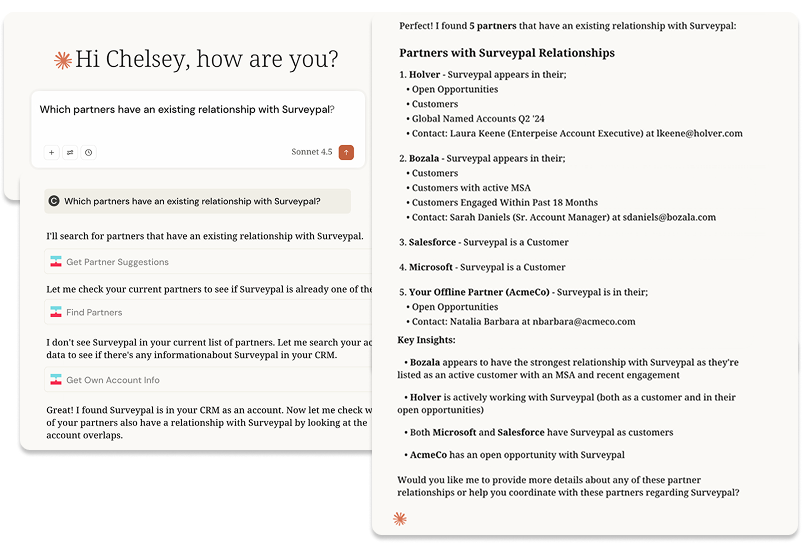
Getting connected doesn't require an engineering project:
- Claude and ChatGPT both have a native Crossbeam connector in their respective app marketplaces. Connect it from Claude's Connectors settings or ChatGPT's Apps Directory, authenticate with your Crossbeam login, and it's live.
- Glean connects the same way, through Glean's Admin Console, so Crossbeam data becomes part of what Glean Assistant and Glean Agents can already see across the rest of your company's tools.
- Your own agents, or any tool that supports custom MCP connections (n8n and Microsoft Copilot both do), can connect using the Crossbeam MCP server URL and your Crossbeam credentials, no custom integration built from scratch.
This is currently rolling out to Supernode and Enterprise customers, with more platforms added on an ongoing basis. For now, usage is unlimited while in beta until September 1st. After that date, you should speak to your account manager if you're interested in understanding more about using Crossbeam MCP after the beta period is over.
The point of building it this way is simple: the account mapping process described in this guide shouldn't require someone to remember to go look. If the context lives in Crossbeam, it should be reachable from wherever you're already asking the question, whether that's a browser tab or a prompt to an agent.
Ready to see your overlaps? Register for free and map your accounts against your partner ecosystem in minutes. No demo required to get started.
Frequently asked questions
1. What is account mapping?
Account mapping is comparing your account list to a partner's to find where you both have a relationship with the same company, so you can act on it: a warm intro, a joint deal, or a heads-up before a renewal risk.
2. What's the difference between account mapping and lead routing?
Account mapping finds the overlap. Lead routing decides what happens next: who gets notified, who owns the follow-up, how fast.
3. How often should we run account mapping?
Continuously, not quarterly. Deal stages and ownership change every week, and stale overlap data is worse than no data, because it creates false confidence.
4. Do we need software for this, or can we do it manually?
Manually works for one or two partners. Past that, it becomes a part-time job that still produces data that's a quarter behind reality.


